JYSK Adjustable Desk DC Motor Controller Reset / Calibration
Introduction
The JYSK Svaneke desk has a lifting DC motor that makes it adjustable. The motor has integrated Hall sensors and there is a controller with two buttons to move the desk up and down. The microcontroller (MCU) in the controller is there only to prevent going beyond top or bottom extreme position, causing damage to the motor.
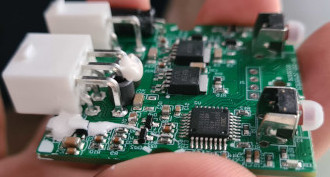
The MCU itself is a Cortex M0+ that runs on 5V and drives two MOSFETs (both having N and P channels) that can invert the polarity and drive the motor in both directions with the power supply voltage (~30V).

Manually applying voltage (e.g. 12V or the original power supply) to pins 4 and 5 would drive the motor.
Issue
The desk stopped responding when clicking up or down arrow. The single LED indicator in the controller lights up in orange for about 10 seconds then it turns off. This is repeated when you press any of the buttons.
The assumption is that the controller has forgotten the current position of the desk and prevents any movement.
Resolution / Fix
We run a reset / recalibration procedure for the controller to be happy.
- Hold the “Down” arrow button for at least 5 seconds.
- The indicator LED starts to pulse slowly. The controller is in calibration mode.
- Press “Down” arrow until the desk is in the lowest / bottom position.
- The LED light should turn off and the calibration is done.
- You can now use your desk. Press “Up” and get it to you preferred height.
Rant
This was not available in the user manual and I had to figure it out myself.
What is more disturbing is that JYSK provides no warranty, if you are a business customer and you buy stuff for your office. This is not the case if you are regular person buying it for home use. I’d avoid them from now on.